
The market-day challenge
Why market-day inventory gets messy fast
Bazaars, pop-ups, and weekend markets move quickly. You may prep in one location, bring only part of your stock to the venue, sell through a rush, then pack down in a matter of hours.
For food and beverage vendors, inventory is rarely just “how many products are left?” It can include:
- Basic Ingredients, such as flour, eggs, dashi, octopus, sauces, or bonito flakes
- Prepared Ingredients, such as takoyaki batter, portioned octopus, topping mixes, or dough
- Packaging Materials, including paper trays, food picks, bags, labels, and napkins
- Finished Products, such as bottled drinks or other pre-packed add-ons sold beside your takoyaki
Packaging shortages are an underrated revenue killer. You can have plenty of food left, but if you run out of cups, lids, trays, or bags, service slows down—or stops completely.
Tako helps keep those stock movements visible, so a missing item is easier to explain. Was it sold? Wasted? Damaged? Restocked? Moved to another stall? The answer should not depend on memory at midnight.
A connected stock record
How Tako helps bazaar and market vendors manage inventory
Track ingredients, packaging, and finished products together
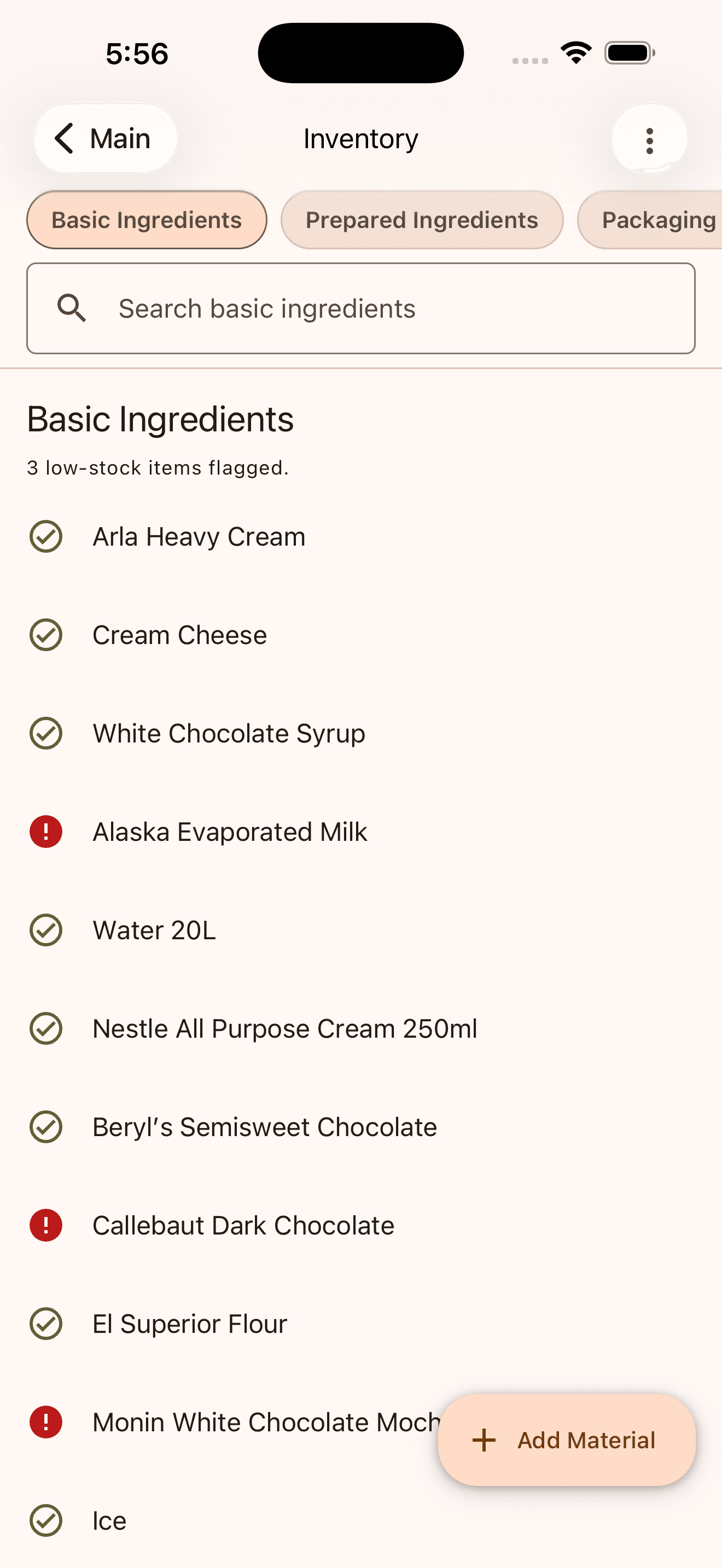
Tako separates inventory into Basic Ingredients, Prepared Ingredients, Packaging Materials, and Finished Products. That gives food stall inventory management a structure that matches how you actually operate.
Instead of tracking octopus but forgetting paper trays, or tracking batter but missing food picks, you can manage the full set of items needed to complete a sale.
Connect recipes to sales
For made-to-order products, you can set up recipes with the ingredients and portions used in each item. When configured, Tako can deduct those recipe ingredients as sales are recorded.
That means a sale is more than revenue—it can also become a record of stock usage.
Produce ready-made stock before service
For pre-packed or pre-made products, Tako supports a Ready to Go workflow. Use Produce Stock to record finished portions before the market opens, while deducting the ingredients used to make them.
For a takoyaki stand, this works well for bottled drinks, pre-packed side items, and other grab-and-go add-ons.
Record purchases, waste, and count corrections
Use Purchases to log the supplier, date, item quantities, and amount paid. This updates stock and helps keep purchase costs tied to your inventory activity.
Use Adjustments for spills, spoilage, damaged packaging, returns, or count corrections. Separating non-sale stock movements from sales makes your closing count much more useful.
Flag low-stock items
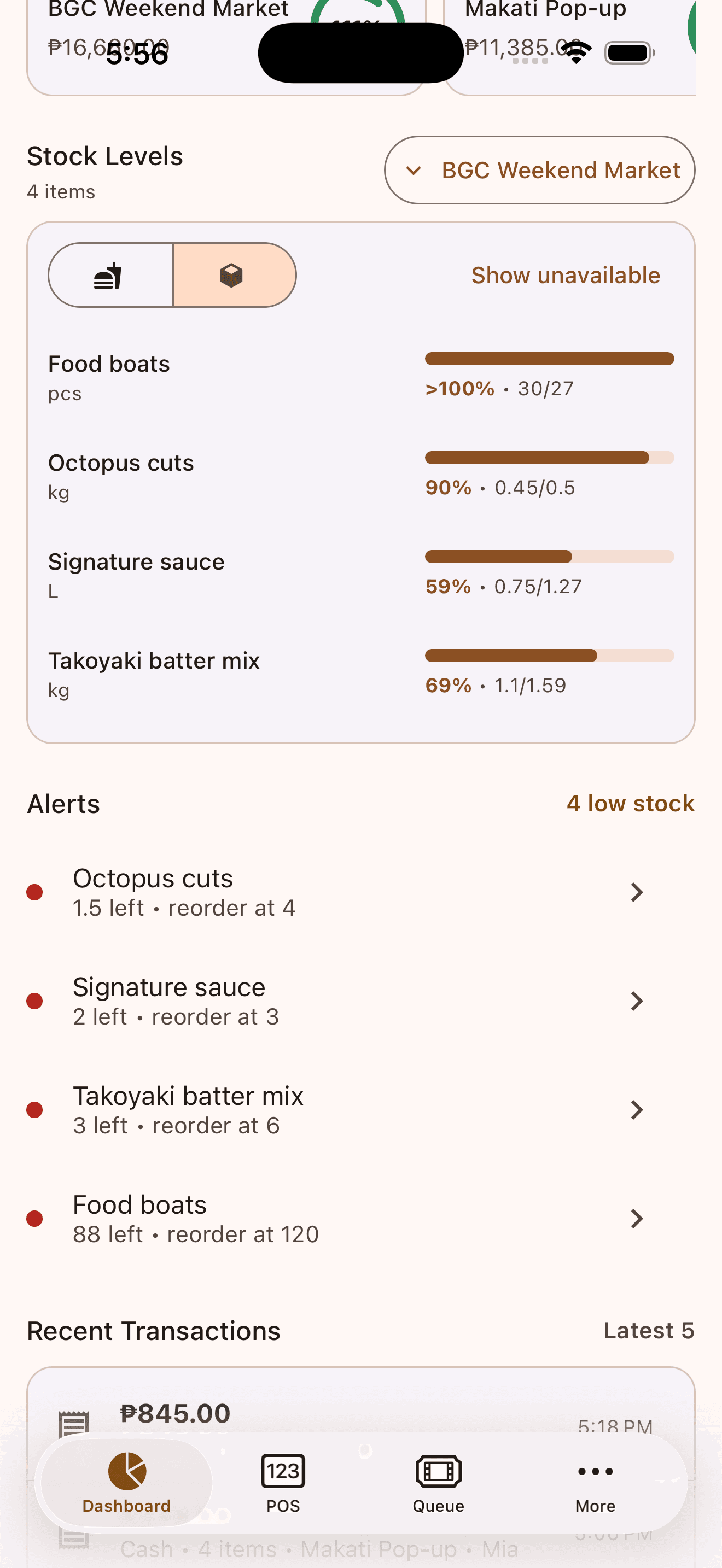
Set a low-stock quantity for important ingredients and packaging materials. Tako flags items when they reach that level, helping you spot what needs attention before the next rush or selling day.
Compare expected stock with physical counts
Opening and Closing Inventory reports let you compare expected quantities with what is actually on hand. If there is a mismatch, you can save the count as recorded or review the cause before adjusting stock.
A repeatable routine
How to use Tako inventory for a market day
Add your ingredients and packaging
Open Inventory and add your Basic Ingredients and Packaging Materials. Use clear names and the unit you actually count in: pieces, grams, kilograms, milliliters, or liters.
Start with the items that are either expensive, fast-moving, or essential to serving a customer. For a takoyaki stand, that may include flour, eggs, dashi, octopus, sauce, mayonnaise, bonito flakes, paper trays, and food picks.
Log purchases as you restock
From Inventory, open Purchases and add the items you bought, quantity received, amount paid, supplier name, and an optional note.
This keeps your market stall stock tracking closer to reality from the beginning. It also gives you a clearer record when ingredient costs change between suppliers or market days.
Set up products and recipes
Create the products you sell, then add the recipe for each product or variant.
The difference between the two product types matters:
Product type Best for How inventory moves Made to Order Takoyaki, fresh drinks, cooked meals Configured recipe ingredients are deducted when the product is sold Ready to Go Bottled drinks, pre-packed sides, baked goods Use Produce Stock to add finished pieces before service and deduct their recipe ingredients Choose Made to Order when stock is consumed at the point of sale. Choose Ready to Go when you make or pack stock before customers arrive.
Keep recipes honest. If one takoyaki order uses six pieces of octopus and one paper tray, record those quantities—not “some octopus” or “one pack.” Accurate portions make recipe-based inventory far more useful.
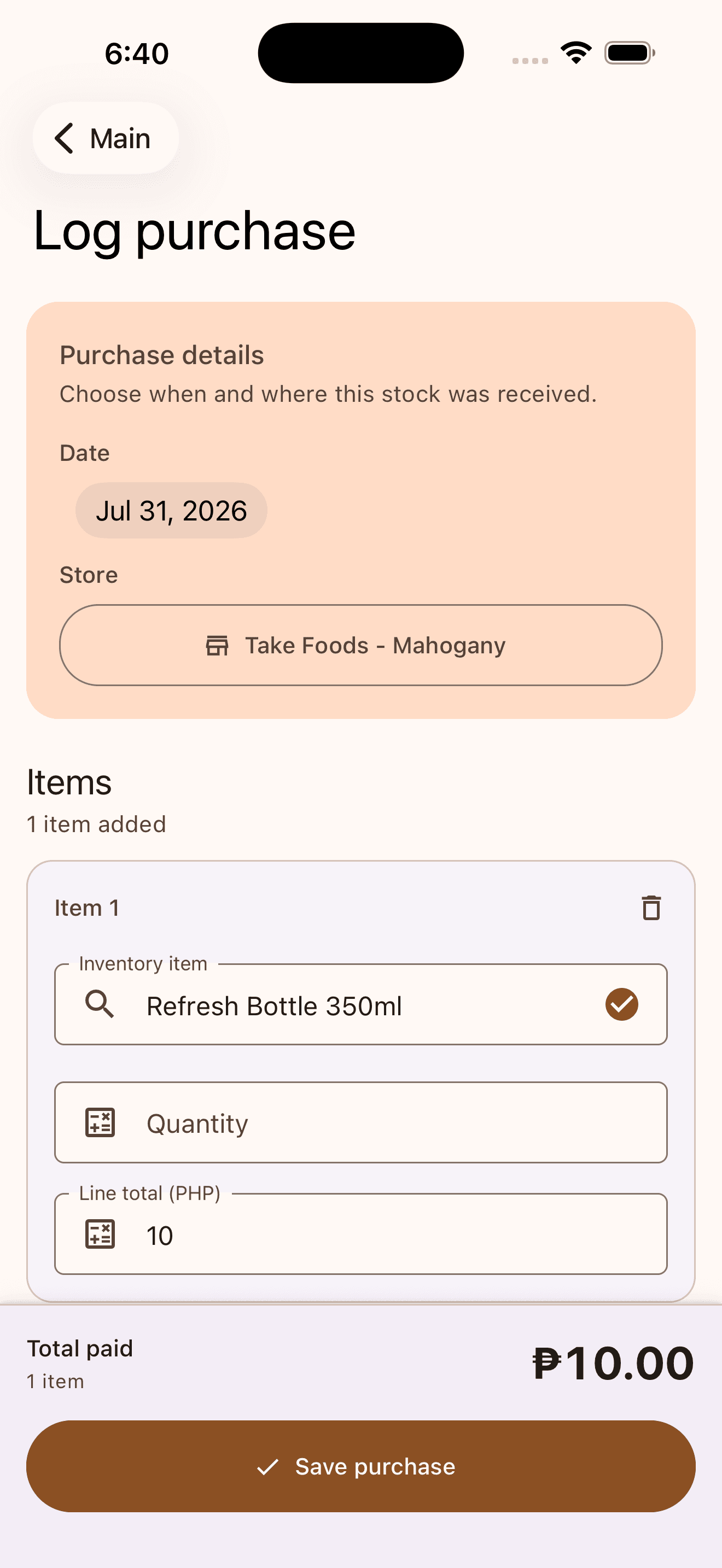
Log received stock with its location, quantity, and purchase cost. 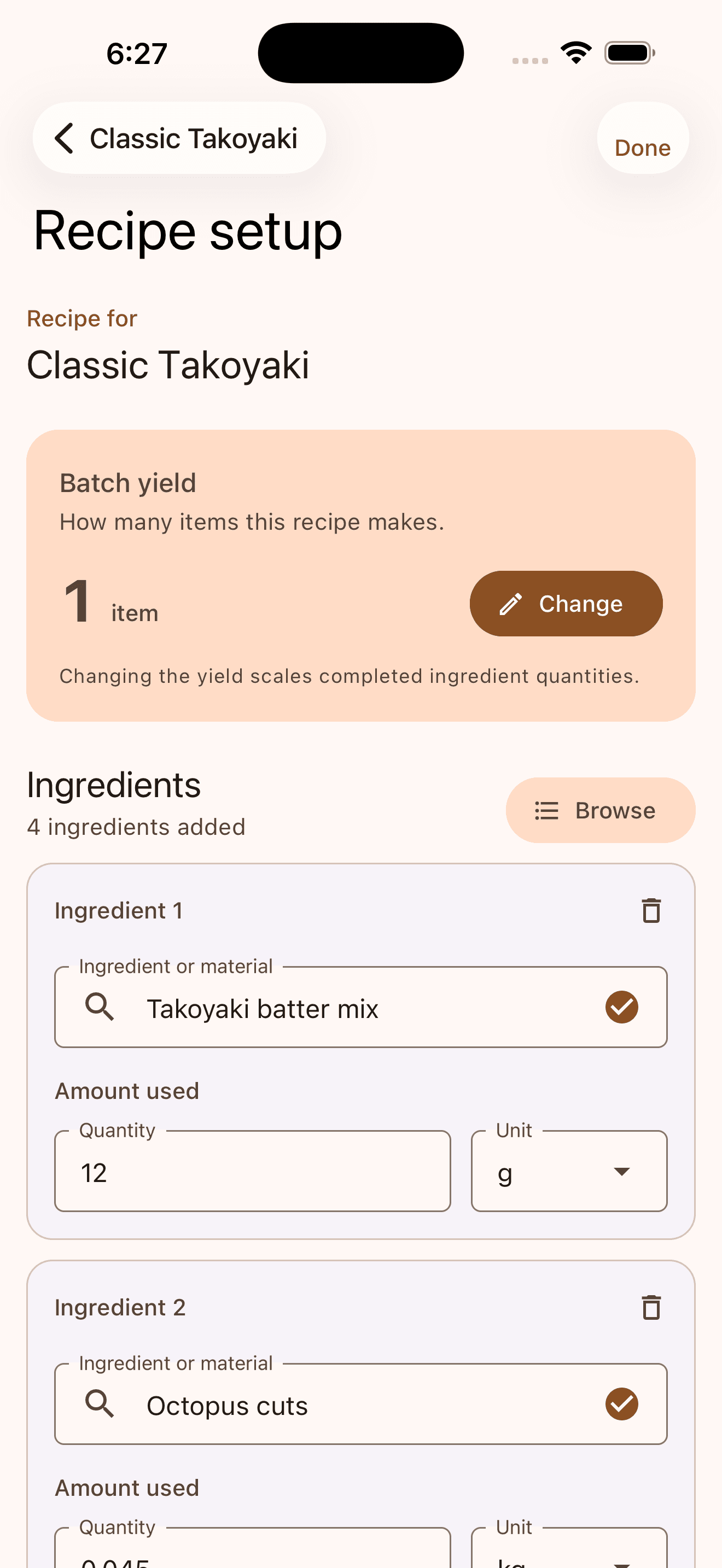
Connect a Classic Takoyaki recipe to measured ingredients so completed orders can record stock usage. Produce or assign stock to the market location
For ready-to-go items, use Produce Stock to record how many finished products you made. If you prep centrally, you can also assign or transfer stock to the market location where it will be sold.
This is especially helpful when you run more than one market stall, rotate between venues, or prepare stock from a central kitchen.
Complete an opening count
Before customers arrive, count the inventory you actually brought to the venue and complete an Opening Inventory report.
Your opening count is your market-day baseline. It gives you a stronger starting point than assuming every item purchased is already at the stall.
Record sales and stock changes as the day happens
As sales are recorded through Tako POS, configured inventory workflows can track relevant stock movement. During quieter moments, log any purchase, spill, damaged item, return, or correction while it is still easy to remember.
Do not wait until closing to reconstruct the whole day.
Complete a closing count before packing up
Before you leave, run a Closing Inventory report and compare expected quantities with the physical count.
If something does not match, check:
- Was a purchase or restock missed?
- Was waste, damage, or spoilage recorded?
- Did a staff member use a different portion size?
- Was stock transferred to another location?
- Was there simply a counting mistake?
Use History to review purchases, sale usage, adjustments, loss or damage, and transfers in one timeline.
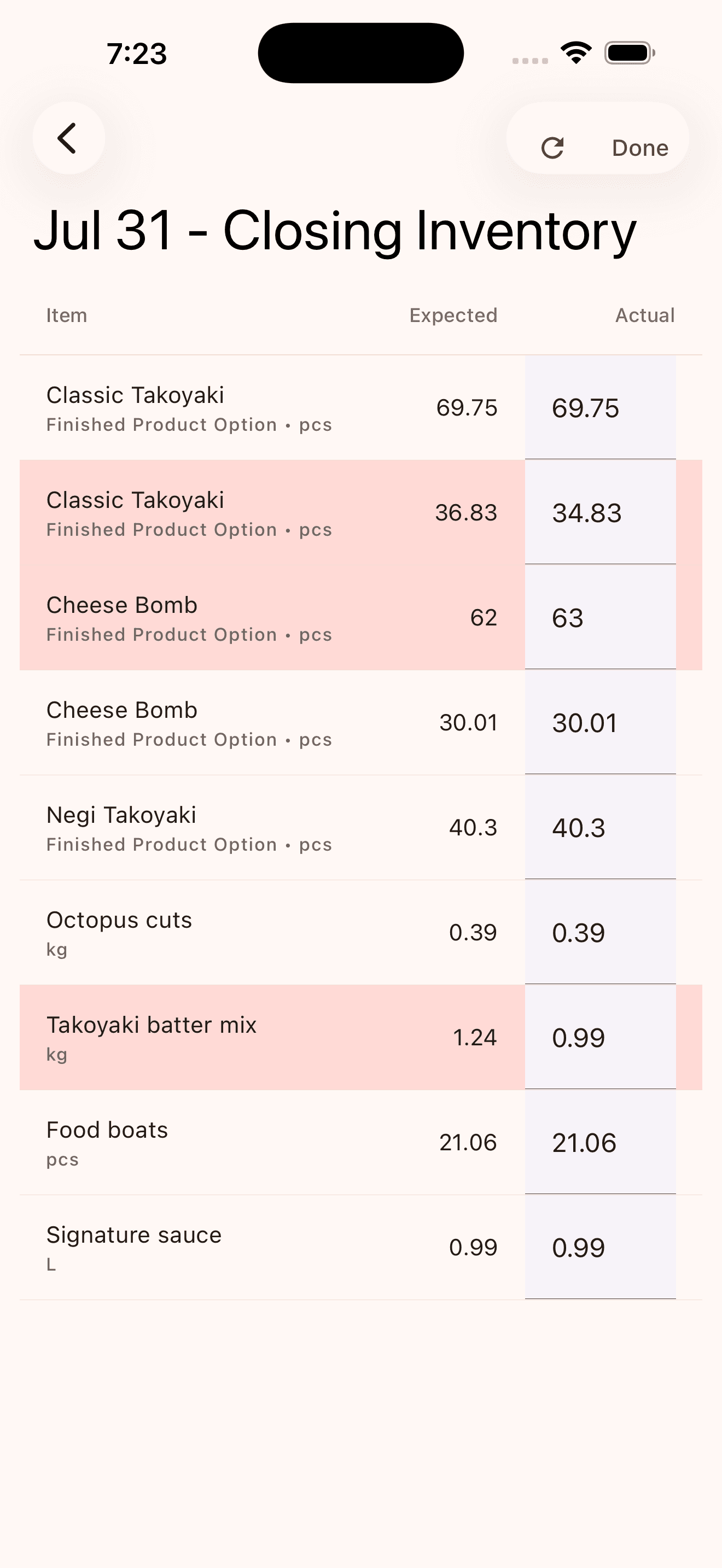
Compare expected and actual quantities, with mismatches highlighted for review. 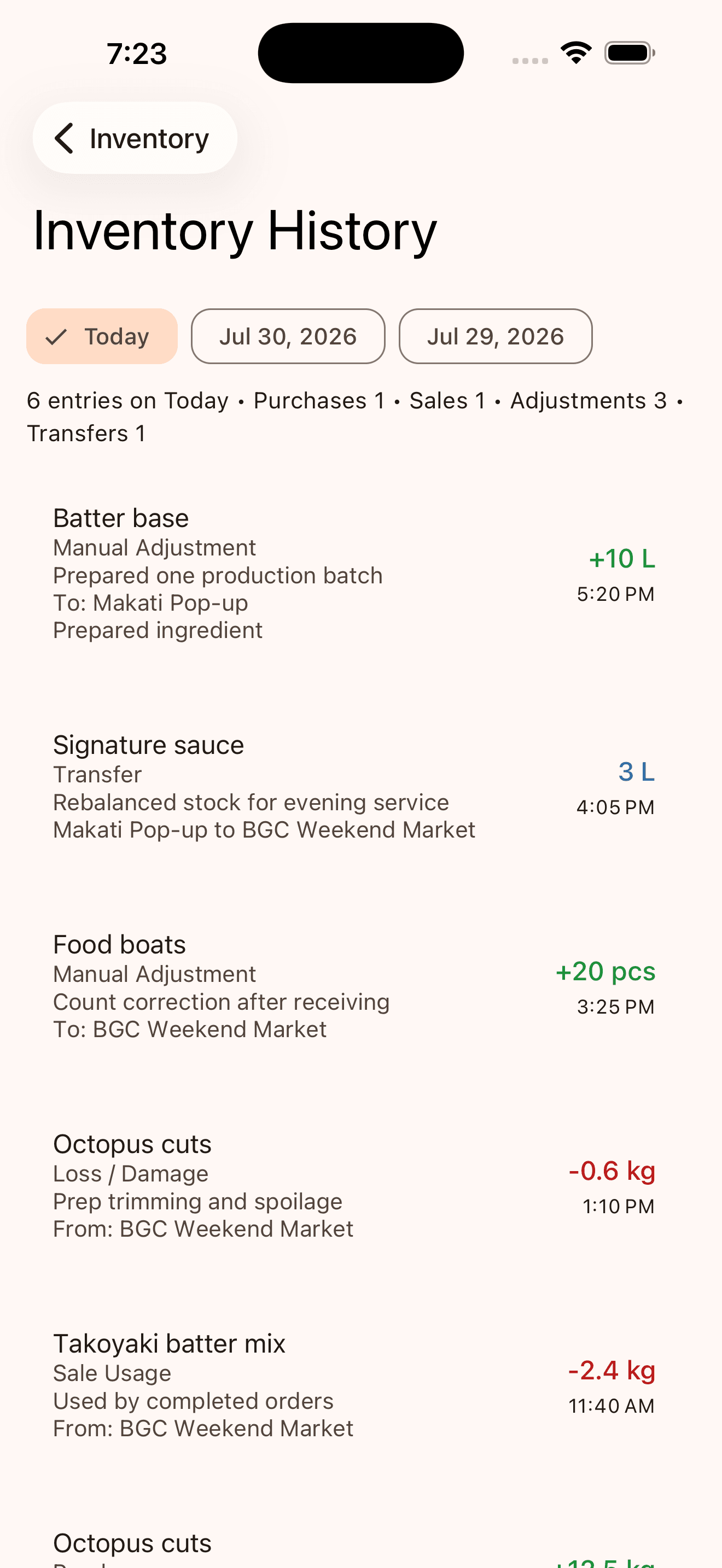
Review the day’s stock movements in one history, including production, transfers, corrections, loss, and sale usage.
See the loop in practice
Example: a weekend takoyaki stand inventory loop
Imagine a vendor selling six-piece takoyaki orders at a Saturday bazaar. They track flour, eggs, dashi, octopus, sauce, mayonnaise, bonito flakes, paper trays, and food picks as inventory materials. They also create a Made to Order Classic Takoyaki product with its recipe.
Before opening, they prepare enough batter for 60 planned orders and complete an opening count. During the day, they log an additional purchase of paper trays and record a spilled batch of batter as loss. At closing, they count the remaining ingredients and packaging, then review History to see what changed.
Instead of asking, “Where did the stock go?” they have a clearer record of sales, purchases, waste, and remaining inventory.
Save this routine
Your 10-minute market-day inventory checklist
Before opening
- Count the stock brought to the venue.
- Check low-stock levels for fast-moving ingredients and packaging.
- Confirm recipes and portion sizes are accurate.
- Record produced finished products.
During service
- Log restocks, waste, and damaged items as they happen.
- Check low-stock flags during a natural break.
- Keep packaging levels visible—not just food ingredients.
Before leaving
- Complete the closing count.
- Review mismatches before adjusting stock.
- Use the results to plan your next purchase and prep batch.
Common questions
Frequently asked questions
What is POS inventory management for market vendors?
POS inventory management helps vendors connect sales, stock counts, purchases, and adjustments in one workflow. For food stalls, that can include ingredients, packaging, prepared items, and finished products.
Does POS inventory replace physical stock counts?
No. Physical counts still matter. Tako gives you an expected quantity based on recorded activity, while opening and closing counts confirm what is actually on hand.
How do market vendors track ingredients when they sell a menu item?
Set up the product recipe with the ingredients and portion sizes it uses. For Made to Order products, configured recipes can record ingredient usage when the product is sold.
How should I record waste, spills, or damaged stock?
Use an inventory adjustment and add a note for loss, damage, spoilage, or a count correction. This keeps waste separate from sales and makes stock differences easier to understand.
Can I track inventory across more than one market stall or location?
Yes. Tako supports assigning and transferring stock between locations, which is useful when you prep centrally or sell at multiple markets.